
miniSMU AppMeasurement software for Windows, macOS and Linux
The included companion application is the fastest way to get up and running with measurements on solar cells, LEDs, transistors, and more.
What's new in v1.4.1Stability Features
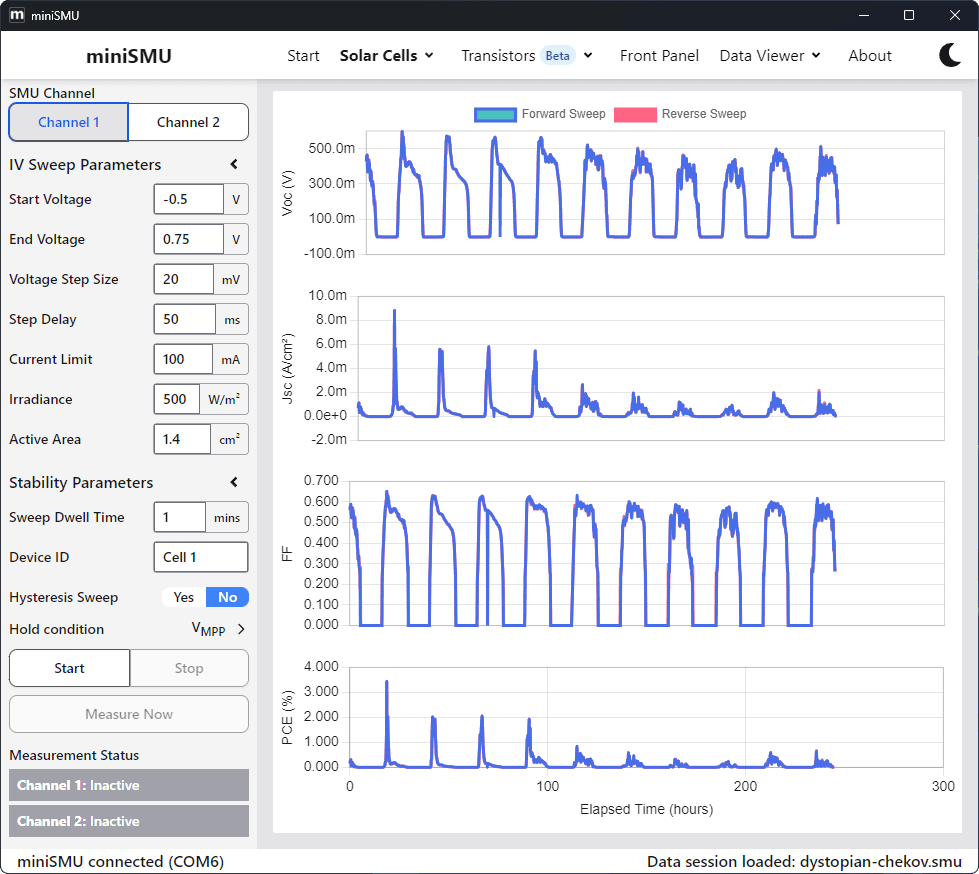
Long-term stability testing
Monitor solar cell performance over extended periods with the I-V Stability feature. Track crucial performance parameters like Voc, Jsc, FF, and PCE as they evolve over time.
- Automate repeated I-V sweeps at customisable intervals
- Visualise performance trends with real-time parameter graphs
- Run experiments for hours, days, weeks, or longer
- Essential for degradation studies and reliable device characterisation
Both miniSMU channels can run simultaneous stability experiments, maximising your research efficiency.
The app in action
Real-time Data Logging
Monitor voltage and current over time with our dual-channel logging capabilities. Perfect for tracking sensor output over time.
Maximum Power Point Tracking
Track the maximum power point of your solar cell in real-time. Our perturb and observe algorithm continuously optimises power output, monitoring performance variations as conditions change.
I-V Curve Measurement
Perform I-V sweeps with real-time curve plotting. Essential for characterising solar cells, LEDs, and other electronic components with precision and clarity.
IDS-VGS Transistor Sweep
Characterise transistors with drain-source current vs. gate-source voltage sweeps. Analyse MOSFET behavior across different operating conditions with ease.
Gate-Source Transfer Characteristics
Examine transistor gate-source transfer behaviors with our specialised sweep function. Extract threshold voltage and other key parameters automatically.
Key features
User-friendly interface
Intuitive design for easy setup and control of experiments with visual feedback and clear navigation. Check out the quickstart guide to get started quickly.
Real-time visualisation
Monitor your measurements in real-time with interactive graphs and data visualisations for immediate insights.
Flexible data export
Export your data in CSV format for seamless integration with your analysis workflow and third-party tools.
Customisable parameters
Fine-tune measurement parameters for precise control over voltage/current ranges, sweep rates, and sampling intervals.
Built-in analysis tools
Calculate key performance metrics automatically for various device types:
- Voc, Jsc, FF, PCE for solar cells
- Transistor threshold voltage
- Resistance calculations
- Maximum power points
System requirements
Windows
- Windows 10 or newer
- 4 GB RAM (8 GB recommended)
- 200 MB free disk space
- USB 2.0 port or Wi-Fi (2.4 GHz)
macOS
- macOS 12 (Monterey) or newer
- Apple Silicon (M1 or later)
- 8 GB RAM
- 300 MB free disk space
- USB 2.0 port or Wi-Fi (2.4 GHz)
LinuxBeta
- Ubuntu 20.04+ or other Debian-based distros (amd64)
- 4 GB RAM (8 GB recommended)
- 200 MB free disk space
- USB 2.0 port or Wi-Fi (2.4 GHz)
Prefer to script your own workflow?
miniSMU ships with official drivers for Python, LabVIEW, and SweepMe!, so it drops straight into your existing automation.
Explore integrations